Mostrando postagens com marcador tecnologia. Mostrar todas as postagens

terça-feira, 9 de agosto de 2011

Enjoy old SNES games on your Xoom using PS3 controller

(image from eu, android)

Yes, that exactly what you read. Now you can play SNES games on your Motorola Xoom using your PS3 controller over bluetooth. Also, this tutorial is an adaptation from an article at Eu, Android and it's intended to be used on Ubuntu only, if you need to use the other OS, please check the original. The Linux specific information is from a cached ubuntu wiki, so I'll copy & paste the relevant part here in case it expire in the future. Right, so cut the crap and let's play! :-)


Needless to say, you must have proper root access on your device - details for brazilians here.

  1. Install Sixaxis Compatibility Checker, open the application, give root permissions and then a popup message will be shown telling you if your device is supported or not (hopefully yes).

  2. Install required libs:
    $ sudo apt-get install libusb-dev libusb-0.1-4

  3. Download sixpair.c (original also hosted at the ubuntu wiki, I did a copy on my github)

  4. Compile it:
    $ gcc -o sixpair sixpair.c -lusb

    Before running sixpair, you'll need the bluetooth mac addr of your Xoom. The easy way to get it is installing Sixaxis Controller - don't worry, you'll need the app anyway to use the controller. The app will display a message "Local Bluetooth Adderss" with the bluetooth mac addr you'll need.

  5. Run sixpair with the Motorola Xoom bluetooth mac addrs you just got as a parameter:
    $ ./sixpair 41:f4:89:6d:41:73

  6. Open the Sixaxis Controller and follow the onscreen instructions - important note: You'll might need to reboot your Xoom to make it work (I had to)
 NOW I WANNA PLAY!
easy... almost there

Install a neat SNES emulator, I choosed Snes9x EX. Now you have to configure your controller to map the keys the emulator uses: Go to Sixaxis Controller -> Menu -> Preferences -> Input Mapping -> 1st Controller mappings. Since I am using Snes9x EX, I set my mapping like this:
  • square: A
  • triangle: S
  • circle: X
  • cross: Z
  • left: Q
  • right: W
  • select: SPACE
  • start: ENTER
  • power: HOME
This way, for example, Snes9x EX will understand that when you press square you're actually pressing A which means the Y button on a normal SNES controller. Yes, I know, confusing as hell, but works.

Now go and have fun :-D

sábado, 11 de dezembro de 2010

GasFinder hits Android Market

GasFinder, o pequeno embrião que nasceu no Yahoo! Open Hack Day deste ano, passou pelo Conip e com versão até pro o Maemo agora ganha uma versão oficial pro Android. Sim meu caro! Duas semanas de intenso trabalho num projeto que está completamente fora do meu universo: Java, Android, JSON e telas em XML. Cá estamos e é com orgulho que apresento o GasFinder. Ainda em sua primeira versão super alfa, mas já é oficial para Android Market. Você pode procurar por GasFinder no Android Market ou pode scanear o código ao lado :-)


Tela inicial: lista de postos e tipos de ordenação


Segunda tela: Endereço do posto, preços dos combustĩveis e possibilidade de ligar, ver no mapa e compartilhar nas redes sociais.

O que é, pra que serve e como funciona? Muito simples comissário! GasFinder é um aplicativo que utiliza de seu local de GPS (ou informação de Wifi) para pesquisar os postos de combustível mais perto de você. O aplicativo é separado em duas partes: A primeira é o back-end (bot) que raspa os dados do site da ANP e transfere para um banco de dados, obra prima do Luciano Camilo (ninja e parceiro do projeto) - então, teoricamente, temos as informações de todos os postos de combustível do Brasil. How cool is that!? :-D A outra parte é a aplicação, eu chamo uma URL com parâmetros de latitude e longitude e recebo um JSON com todas as informações dos postos da região. Da pra ordenar por preço, por distância, ver no mapa, compartilhar e ligar pro posto.


Um dos objetivos de lançar esta versão *agora* era para participar do concurso Android Lab da Huawei que encerrou as inscrições dia 10/dez. Bem, nem precisa dizer, aplicativo open source, ainda bastante bugado, então... Reportem bugs, mandem emails, dêem sugestões e feedbacks! :-)

Special thanks to: Luciano (partner no projeto, cuidou de toda a parte de back-end e garimpagem de dados), namorada (que me aguentou por algumas semanas sem dormir direito), PradoG (que teve saco pra me ajudar com Java) e Felipe Fedel (que tem as manhas de integrar Java e JSON). Thank you all, bros :-)

[update] Para quem estranhamente não está conseguindo instalar do Android Market, aqui vai o link direto para GasFinder no meu Public do DropBox. Qualquer problema, por favor, me avisem nos comentários.

quarta-feira, 14 de abril de 2010

Ethernet over USB with N900 and Gentoo

Meta: It's been a while since I got my new N900. I sold my old device to Kleber and I acquired the new N900 from Etrunko, hell I wanted this gadget. This tutorial is for gentooers only, ubuntuers can connect and use it right away without any changes.


Since that date, I've been playing and hacking around this incredible device. Yesterday I was trying to debug why in hell my bloody bastard wifi connection keeps on dropping so often. Opening a terminal and checking dmesg or /var/log/messages on that tiny little screen was a pain, so I decided to try out the ethernet over usb.

You can follow all the above tutorial on a Gentoo box. The only problem I found was to find the correct modules in my kernel to load - as Gentoo doesn't behave as Ubuntu and loads the whole world in the memory. :P

So, here it is:

otubo@minivader ~ $ lsmod|grep usb
usbnet 17188 1 cdc_ether
mii 5212 1 usbnet

Find, compile (if not yet) and load these modules. These modules, with the correct udev rules will create a usb0 interface on both devices. Make sure the interfaces are configured properly to be on the same network.

That's it. Now you're able to plug you USB cable and have a full operational network with it. Enjoy! :-D

[update] DO NOT set a static mac add as said in the original tutorial. In my case, the module g_nokia didn't load just because of this.

terça-feira, 23 de março de 2010

Android 2.1 no Milestone brasileiro

Já faz uma semana que instalei o Android 2.1 no Milestone e estou devendo algumas considerações. Ah, só uma observação, instalei exatamente do mesmo jeito que as outras, só mudei a imagem (já atualizei aquele outro post com o link pro 2.1)

Prós:
* Aparentemente mais rápido. O slide entre desktops, o menu de aplicações e a barrinha de avisos tem animações mais naturais e com menos lags.
* Aplicativos novos: No Android 2.1 tem Google Earth liberado, tem widget para Latitude e Google Buzz, bastante prático e útil pra quem usa com frequência.
* Número de desktops configurável, agora dá pra configurar nativamente (sem o Helix) até 9 desktops, tem até uma barrinha com uma bolinha vermelha no topo da tela mostrando em qual desktop você está.
* Live Wallpapers, all those fancy live wallpapers do Nexus One estão nessa atualização.
* Quick Office e Facebook já vem instalado.
* Aplicativos novos: All Videos e Camcorder.
* O relógio do dock agora tem controle de luminosidade por uma barrinha. Agradou.

Contras:
* A instalação APAGA TODOS OS SEUS DADOS. E eu não sabia disso. Cuidado! :-\
* A versão que instalei, a européia, interpreta os números dos contatos como xxx-xxx-xxxx. Isso faz uma bagunça quando a sua lista de contatos inclui números de operadoras e DDD no formato xx xx xxxx xxxx. Isso implica que o android não reconhece mais as chamadas, uma droga.
* Problemas de travamento frequente usando Foursquare, Twidroid e Helix home. Realmente perturbador se você usa com frequência esses aplicativos (eu).
* Ainda tem o problema de não vir pré-configurado as APNs da VIvo. Esse link diz como configurar, foi por lá que me segui e deu tudo certo com o meu 3G

Outra coisa que vem me incomodando desde a versão 2.0 - e ainda não foi corrigido - é em relação ao storage. Acontece quando copio grandes quantidades de dados (uma pasta de 2.5GB de músicas, por exemplo), chega num ponto da cópia que meu dá IO Error. O device fica maluco e trava TUDO. Tenho que tirar a bateria pra rebootar. Hey Google, if you're reading this, PLEASE fix it, ok?

E agora me resta apenas a triste notícia de que vou voltar pro Android 2.0.1, mais notícias em breve aqui ou no meu twitter.

Agradecimentos ao Haydt e ao Uatafóc pelas dicas.

segunda-feira, 22 de março de 2010

otubo no Yahoo! Open Hack Day Brasil 2010: O day-after

en_US:
An awesome event, unlike any I've ever gone so far.
Unlike the Intercon's, Campus Party's and the FISL. Yahoo was very happy to come up with such an event and the reasons are quite simple.


 Perfect atmosphere for fun, and that's exactly what it is: fun. (Photo: velozocomz)

1) Perfect atmosphere: air-conditioning (and believe me, a good temperature is ideal for the creativity), food on a regular frequency, free coffee, stable wifi, video games and toys. In parallel, they played music chosen by twitter (not having to fight) and in the cold dawn had even Monty Python session on screen. Exactly what you need to get a friendly environment for computer geeks to create and have fun.

2) The purpose of the event: The proposal is clear, get together some computer geeks interested in creating new things, put a friendly environment and encourage them with prizes. Clear that Yahoo is not dumb, the main award categories are for libraries and technology of Yahoo (off course, I would do the same). But something that is interesting is the support for creating and developing over any platform, including things VERY low level, like the Arduino.

3) Fantastic team: The Yahoo team was extremely professional and friendly. Always trying to help, whether solving technical problems or playing Guitar Hero. Either through post-its on the dashboard or twits on screen, the means of communication for problem solving was very transparent and straightforward.

Just a curious detail, Yahoo that I'm sorry, but I thought Open Hack Day a term means overrated. 90% of projects were mashups (including mine). But ok, did not hurt anything, just making my point.


And now the star of the event: The Gas Finder.

Met
Luciano Camilo there on Saturday. He had an almost completed project that mines information at the ANP, build a table and exports in XML to find cheap fuel using google maps. He wanted to make a mashup with this YQL. I thought: Man! Let's put it on a phone and use GPS and so on and so! Okay, we had an idea, two programmers and a goal: Complete a proof of concept until 13h the next day.


Gas Finder on the projector. Glad I did not crashed on time. (Photo: imbertti)

After some headaches with Android, ASE, Python and YQL, we managed to finish the prototype of Gas Finder almost at 5 am Sunday. Everything commited and we are testing and polishing edges here and there. On Sunday the presentation was good, thank god it didn't crashed with timeout - what use to happen when getting YQL info or GPS signal. In the end, I am proud to announce I recieved from Fabio Akita the award for the best YQL application with Gas Finder! HELL YEAH!

More information and other projects can be found on the blog or Chapiewski William James Doria.

I hope to go next year to play a little more. Thanks Yahoo, thanks Luciano. :-)


pt_BR:

Um evento sensacional, diferente de todos que já fui até agora. Diferente dos Intercon's dos Campus Party's e do FISL. Yahoo foi muito feliz em montar um evento desses e os motivos são bem simples.


 Atmosfera perfeita para copmuteiros se divertirem, e é exatamente disso que se trata: diversão. (foto: velozocomz)

1) Atmosfera perfeita: Ar condicionado (e acredite, uma temperatura boa é IDEAL para fazer o lado criativo funcionar), comida em uma frequência regular, café à vontade, wifi estável, video games, brinquedos e puffes. Em paralelo, rolou música escolhida por twitter (pra não ter briga) e na madrugada fria teve até sessão de Monty Python no telão. Exatamente tudo o que você precisa pra ter um ambiente amigável pra computeiros criarem e se divertirem bastante.

2) O objetivo do evento: A proposta é bem clara, juntar computeiros interessados em criar coisas novas, botar num ambiente amigável e incentivá-los com prêmios. Claro que o Yahoo não é bobo, as principais categorias de premiação são de bibliotecas e tecnologias do Yahoo (lógico, eu também faria o mesmo). Mas algo que é interessante é o apio à criação e ao desenvolvimento em cima de qualquer plataforma, incluindo coisas BEM baixo nível, como o Arduino.

3) Equipe fantástica: A equipe do Yahoo foi extremamente profissional e simpática. Sempre tentando nos ajudar, seja resolvendo problemas técnicos ou fazendo par no Guitar Hero. Seja por meio de post-its no painel ou twitts no telão, o meio de comunicação para a resolução de problemas foi bastante transparente e direto ao ponto.

Só um detalhe curioso, Yahoo que me desculpe, mas achei Open Hack Day um termo meio overrated. 90% dos projetos foram de mashups (incluindo o meu). Mas ok, não atrapalhou em nada, só me fez pensar.

E agora a grande estrela do evento: The Gas Finder.

Conheci o Luciano Camilo lá no sábado. Ele já tinha um projeto quase completo de garimpar informações na ANP para montar uma tabela (e exporta num XML amigável) os postos com combustível barato usando google maps e tal. Ele queria fazer um mashup disso com YQL e tal. Pensei na hora: Cara! Vamos botar isso no celular e usar GPS e tal e coisa! Pronto, tínhamos uma idéia, dois computeiros e um objetivo: Terminar uma prova de conceito até 13h do dia seguinte.

Gas Finder em operação no projetor. Ainda bem que não crashou na hora. (foto: imbertti)

E não é que foi? Depois de algumas dores de cabeça com Android, ASE, Python e YQL conseguimos terminar o protótipo do Gas Finder lá pelas 5h da manhã do domingo. Commitamos tudo e ficamos testando e polindo umas arestas aqui e alí. No domingo a apresentação foi boa, não travou e nem crashou - o que costumava acontecer se desse timout no YQL ou na hora de pegar o sinal do GPS. Resumo da Ópera, tivemos a felicidade de receber da mão de Fábio Akita o prêmio de melhor aplicação YQL. HELL YEAH!

Mais informações e outros projetos podem ser encontrados no blog do Guilherme Chapiewski ou no Tiago Dória.

Espero poder ir ano que vem pra nerdear madrugada a dentro. Valeu Yahoo, valeu Luciano. :-)

ps.: Pode parecer post-puxa-saco, post-pago, blé, mas é tudo verdade.

terça-feira, 16 de março de 2010

otubo no Yahoo! Open Hack Day Brasil 2010

Este final de semana, 20 e 21 de março, vou participar do Yahoo! Open Hack Day. E neste eu nunca fui. O que já me agradou de primeira é o nome combinar direitinho com o clima do evento. Hack no sentido de pegar um projeto existente (ou algum que seja pensado na hora) e programar. Simples assim. Hackear o final de semana inteiro ao redor dele.


Sim, eventualmente haverão palestras e ... AH! WHO CARES? Palestra a gente baixa ou vê no youtube, juntar computeiros pessoalmente pra trocar idéias e programar não.

Nos vemos lá?
Happy hacking!

quarta-feira, 3 de março de 2010

Atualizando Motorola Milestone Brasileiro para Android 2.0.1

Disclaimer: Todo o procedimento aqui descrito foi concedido gentilmente pelo Rodrigo Haydt.

Disclaimer2: É com muita dor no coração que digo que neste tutorial usaremos Windows e ferramentas proprietárias de código fechado da Motorola. O que particularmente é um absurdo. Pra que diabos a gente precisa de ferramentas proprietárias e que rodem no Windows pra flashar um device que roda Linux? Mas enfim, dancemos conforme a música :-(

Disclaimer3: Faça todo este procedimento por sua conta em risco. Fazer de forma errada o procedimento pode brickar seu telefone e transforma-lo em um elegantíssimo peso de papel. Tenha certeza que seu celular esteja carregado em 100% e que não haverá falhas ou interrupção de energia elétrica - recomendo fazer de um notebook para evitar este último.
1) A receita de bolo é bastante simples, pegue os ingredientes:
Motorola Driver Installation 4.2.0 - Windows (32bit / 64bits)
RSD Lite 4.6 [update: o arquivo não está mais neste servidor, não achei na busca que fiz. Se alguém achar poste ai nos comentários]
2) Pegue a imagem inglesa do Android 2.0.1 que instalaremos no celular e descompacte. [update: imagem brasileira do android 2.0.1 já disponível] [update2: imagem européia do android 2.1 já disponível]

3) Em seu Milestone, vá em Settings > Applications > Development e ative o USB Debugging.

4) Conecte seu telefone ao computador pela porta USB utilizando o cabo de dados.

5) Espere até o Windows achar seu device, instalar os drivers e tal e coisa. Tudo isso feito, abra o RSD Lite e espere até que o device A853 apareça na tabela.

6) Selecione o arquivo de imagem que você descompactou na caixa de texto e clique em Start.

7) Agora é a hora que a mágica do software proprietário acontece. Todo o processo vai demorar uns 10min e o telefone irá rebootar umas 3 vezes. O RSD Lite eventualmente pedirá pra ligar o celular e como você leu este tutorial você NÃO FARÁ ISSO. Seja paciente e espere até que esteja escrito Finished e PASS na tabela do RSD Lite.

Pronto, agora você tem o Android 2.0.1 no seu Motorola Milestone GSM Brasileiro. E aí, o que eu ganho com isso? Agora você vai poder instalar o Google Earth (que é mais cool do que útil por enquanto), vai poder instalar um novo aplicativo pro Dock (que é menos brilhante e você poderá dormir com mais facilidade) e vai poder instalar um novo Home (que é o nativo do Nexus 1, é cool também, mas ainda ta cheio de bug). Agora sério, a atualização deixou o Android mais rápido e aquelas travadas (e até reboots) esporádicos sumiram. A tela me pareceu mais responsiva e o consumo de bateria diminuiu sensivelmente.

Downgrade: Caso você não tenha gostado, ou tenha bugado seu telefone por algum motivo, você pode fazer o downgrade usando o mesmo procedimento mas com a imagem do Android 2.0.

Importante: O upgrade conserva todas as configurações do seu aparelho, o que não é verdade no caso do downgrade. Seu celular vai estar como se estivesse tirado da caixa.

quarta-feira, 16 de dezembro de 2009

VIVO 3G using Huawei e1756 on Ubuntu 9.10 Karmic

Quick and fast tip to show a way to connect to 3G using Hawei e1756 modem on Ubuntu 9.10 Karmic.

The problem: The modem itself has a little micro-SD card reader inside and guess what? The kernel identifies it as card reader and not as a 3G modem. Good. ¬¬"

The fix: To solve this minor issue, first you have to install a tool that helps you to switch between storage device and usb serial device, the usb_modeswitch. For this just apt-install the usb-modeswitch package.

Then, modify its config file (/etc/usb_modeswitch.conf) adding the lines below:
# Huawei E1692/E1756
DefaultVendor= 0x12d1
DefaultProduct= 0x1446

TargetVendor= 0x12d1
TargetProduct= 0x140c

MessageContent="55534243000000000000000000000011060000000000000000000000000000"

CheckSuccess=5

These lines tells your usb_modeswitch that if the vendor id 0x12d1 and the product id 0x1446 are found on your usb devices, then it will be switched to product id 0x140c. It means that the usb_modeswitch will switch from storage device to 3G modem. So far so good. :)

Then we have to write a udev rule that tells the system to ignore the card reader and identify it as a 3G modem as we plug it in. Write a file named /etc/udev/rules.d/15-hauwei.rules containing these lines:

SUBSYSTEM=="block", \
ACTION=="add", \
SYSFS{idVendor}=="12d1", \
SYSFS{idProduct}=="1446", \
OPTIONS="ignore_device"

SUBSYSTEM=="usb", SYSFS{idProduct}=="1446", SYSFS{idVendor}=="12d1", RUN+="/usr/sbin/usb_modeswitch"

Your udev now will run usb_modeseitch every time you plug in an usb stick with product id and vendor id matching those values.

Restart your udev:
$ service udev restart

And now, your system should be able to identify your 3G modem. After all these done, you have to configure your NetworkManager. This last step is pretty simple and strightforward, so, I will let you handle this by yourself :)

Any problems please feedback!

[update] I wrote this post drinking wine (long story) and I completely forgot to thank Ursinha for the usb_modeswitch tip. Soooorry and thank you bro! :-)

[update 2] And it seems that NetworkManager doesn't like 3G modems, at least not now. So I had to configure some extra lines on /etc/wvdial.conf and /etc/ppp/options in order to use wvdial and connect using /dev/nail (yeah, that was a joke, there is no such a device):

otubo@minivader ~ $ cat /etc/wvdial.conf

[Dialer 3g]
; Init2 = ATQ0 V1 E1 S0=0 &C1 &D2 +FCLASS=0
Modem Type = Analog Modem
; Phone =
ISDN = 0
; Username =
Init1 = ATZ
Init2 = ATQ0 V1 E1 S0=0 &C1 &D2
; Init3 = AT+CGDCONT=1,"IP","zap.vivo.com.br"
; Password =
Modem = /dev/ttyUSB0
Baud = 921600
DialCommand = ATDT
Check Def Route = on
FlowControl = Hardware(CRTSCTS)
; Username = 1997848815@vivozap.com.br
Username = vivo
Password = vivo
Phone = *99#
Stupid mode = 1
Auto Reconnect = on
Auto DNS = on

otubo@minivader ~ $ egrep -v '#|^ *$' /etc/ppp/options
asyncmap 0
noauth
crtscts
lock
hide-password
modem
proxyarp
lcp-echo-interval 30
lcp-echo-failure 4
noipx
asyncmap 0xa0000
mru 1500
refuse-chap
ipcp-max-failure 30


Then, to connect to internet using your 3G modem you just have to run:

root@minivader:~# wvdial 3g
--> WvDial: Internet dialer version 1.60
--> Cannot get information for serial port.
--> Initializing modem.
--> Sending: ATZ
ATZ
OK
--> Sending: ATQ0 V1 E1 S0=0 &C1 &D2
ATQ0 V1 E1 S0=0 &C1 &D2
OK
--> Modem initialized.
--> Sending: ATDT*99#
--> Waiting for carrier.
ATDT*99#
CONNECT
--> Carrier detected. Starting PPP immediately.
--> Starting pppd at Thu Dec 17 20:38:52 2009
--> Pid of pppd: 3488
--> Using interface ppp0
--> local IP address 187.88.116.150
--> remote IP address 10.64.64.64
--> primary DNS address 200.142.130.202
--> secondary DNS address 200.220.227.100

And this time, special thanks to Kleber that helped me debugging that shit :-)

sexta-feira, 16 de outubro de 2009

How to connect a GPS phone to a Computer via bluetooth

A very quick post to show how these things work togheter. I connected a Nokia E71 GPS to my ThinkPad T61 running Ubuntu 9.04 Janty Jackalope using bluetooth connection. The initial idea was to use Google Earth as my main GPS screen while driving, but unfortunately I couldn't make it work *yet*.

Step 1) Going right to the point: First you need to be sure that you mobile phone exports the GPS service via bluetooth. And that's simple to get. First you must edit yout /etc/bluetooth/hcid.conf to look like this:

root@phoenix:/etc/bluetooth# cat hcid.conf
#
# HCI daemon configuration file.
#

# HCId options
options {
# Automatically initialize new devices
autoinit yes;

# Security Manager mode
# none - Security manager disabled
# auto - Use local PIN for incoming connections
# user - Always ask user for a PIN
#
security none;

# Pairing mode
# none - Pairing disabled
# multi - Allow pairing with already paired devices
# once - Pair once and deny successive attempts
pairing multi;

# PIN helper
#pin_helper /usr/bin/bluepin;

# D-Bus PIN helper
#dbus_pin_helper;
}

# Default settings for HCI devices
device {
# Local device name
# %d - device id
# %h - host name
name "otubotp";

# Local device class
class 0x3e0100;

# Default packet type
#pkt_type DH1,DM1,HV1;

# Inquiry and Page scan
iscan enable; pscan enable;

# Default link mode
# none - no specific policy
# accept - always accept incoming connections
# master - become master on incoming connections,
# deny role switch on outgoing connections
lm accept;

# Default link policy
# none - no specific policy
# rswitch - allow role switch
# hold - allow hold mode
# sniff - allow sniff mode
# park - allow park mode
lp rswitch,hold,sniff,park;

# Authentication and Encryption (Security Mode 3)
#auth enable;
#encrypt enable;
}


Step 2)
Restart you bluetooth daemon:

root@phoenix:~# /etc/init.d/bluetooth restart
* Stopping bluetooth [ OK ]
* Starting bluetooth [ OK ]


Step 3) Turn on the bluetooth on your phone and get ready to scan devices:

root@phoenix:~# hcitool scan
Scanning ...
00:21:FE:xx:xx:xx mycellphone


Step 4) Then, check if your phone exports GPS data via bluetooth running sdptool. In this step you need to pay attention to the Service Names and to the channel they use. We're gonna use these informations later on.

root@phoenix:~# sdptool browse 00:21:FE:F8:2F:E2
Browsing 00:21:FE:F8:2F:E2 ...
Service Name: AVRCP Target
Service Description: Audio Video Remote Control
Service Provider: Symbian Software Ltd.
Service RecHandle: 0x10000
Service Class ID List:
"AV Remote Target" (0x110c)
Protocol Descriptor List:
"L2CAP" (0x0100)
PSM: 23
"AVCTP" (0x0017)
uint16: 0x100
Profile Descriptor List:
"AV Remote" (0x110e)
Version: 0x0100

Service Name: Hands-Free Audio Gateway
Service RecHandle: 0x10004
Service Class ID List:
"Handsfree Audio Gateway" (0x111f)
"Generic Audio" (0x1203)
Protocol Descriptor List:
"L2CAP" (0x0100)
"RFCOMM" (0x0003)
Channel: 1
Language Base Attr List:
code_ISO639: 0x454e
encoding: 0x6a
base_offset: 0x100
Profile Descriptor List:
"Handsfree" (0x111e)
Version: 0x0105

Service Name: Headset Audio Gateway
Service RecHandle: 0x10005
Service Class ID List:
"Headset Audio Gateway" (0x1112)
"Generic Audio" (0x1203)
Protocol Descriptor List:
"L2CAP" (0x0100)
"RFCOMM" (0x0003)
Channel: 2
Language Base Attr List:
code_ISO639: 0x454e
encoding: 0x6a
base_offset: 0x100
Profile Descriptor List:
"Headset" (0x1108)
Version: 0x0100

Service Name: Audio Source
Service RecHandle: 0x10027
Service Class ID List:
"Audio Source" (0x110a)
Protocol Descriptor List:
"L2CAP" (0x0100)
PSM: 25
"AVDTP" (0x0019)
uint16: 0x100
Language Base Attr List:
code_ISO639: 0x454e
encoding: 0x6a
base_offset: 0x100
Profile Descriptor List:
"Advanced Audio" (0x110d)
Version: 0x0100

Service Name: AVRCP Controller
Service Description: Audio Video Remote Control
Service Provider: Symbian Software Ltd.
Service RecHandle: 0x10028
Service Class ID List:
"AV Remote" (0x110e)
Protocol Descriptor List:
"L2CAP" (0x0100)
PSM: 23
"AVCTP" (0x0017)
uint16: 0x100
Profile Descriptor List:
"AV Remote" (0x110e)
Version: 0x0100

Service Name: SyncMLClient
Service RecHandle: 0x10029
Service Class ID List:
UUID 128: 00000002-0000-1000-8000-0002ee000002
Protocol Descriptor List:
"L2CAP" (0x0100)
"RFCOMM" (0x0003)
Channel: 10
"OBEX" (0x0008)
Language Base Attr List:
code_ISO639: 0x454e
encoding: 0x6a
base_offset: 0x100
Profile Descriptor List:
"" (0x00000002-0000-1000-8000-0002ee000002)
Version: 0x0100

Service Name: OBEX File Transfer
Service RecHandle: 0x1002a
Service Class ID List:
"OBEX File Transfer" (0x1106)
Protocol Descriptor List:
"L2CAP" (0x0100)
"RFCOMM" (0x0003)
Channel: 11
"OBEX" (0x0008)
Language Base Attr List:
code_ISO639: 0x454e
encoding: 0x6a
base_offset: 0x100
Profile Descriptor List:
"OBEX File Transfer" (0x1106)
Version: 0x0100

Service Name: Nokia OBEX PC Suite Services
Service RecHandle: 0x1002b
Service Class ID List:
UUID 128: 00005005-0000-1000-8000-0002ee000001
Protocol Descriptor List:
"L2CAP" (0x0100)
"RFCOMM" (0x0003)
Channel: 12
"OBEX" (0x0008)
Language Base Attr List:
code_ISO639: 0x454e
encoding: 0x6a
base_offset: 0x100
Profile Descriptor List:
"" (0x00005005-0000-1000-8000-0002ee000001)
Version: 0x0100

Service Name: SyncML DM Client
Service RecHandle: 0x1002c
Service Class ID List:
UUID 128: 00000004-0000-1000-8000-0002ee000002
Protocol Descriptor List:
"L2CAP" (0x0100)
"RFCOMM" (0x0003)
Channel: 13
"OBEX" (0x0008)
Language Base Attr List:
code_ISO639: 0x454e
encoding: 0x6a
base_offset: 0x100
Profile Descriptor List:
"" (0x00000004-0000-1000-8000-0002ee000002)
Version: 0x0100

Service Name: Nokia SyncML Server
Service RecHandle: 0x1002e
Service Class ID List:
UUID 128: 00005601-0000-1000-8000-0002ee000001
Protocol Descriptor List:
"L2CAP" (0x0100)
"RFCOMM" (0x0003)
Channel: 14
"OBEX" (0x0008)
Language Base Attr List:
code_ISO639: 0x454e
encoding: 0x6a
base_offset: 0x100
Profile Descriptor List:
"" (0x00005601-0000-1000-8000-0002ee000001)
Version: 0x0100

Service RecHandle: 0x1002f
Protocol Descriptor List:
"L2CAP" (0x0100)
"RFCOMM" (0x0003)
Channel: 3

Service Name: Dial-Up Networking
Service RecHandle: 0x10030
Service Class ID List:
"Dialup Networking" (0x1103)
Protocol Descriptor List:
"L2CAP" (0x0100)
"RFCOMM" (0x0003)
Channel: 4
Language Base Attr List:
code_ISO639: 0x454e
encoding: 0x6a
base_offset: 0x100
Profile Descriptor List:
"Dialup Networking" (0x1103)
Version: 0x0100

Service Name: OBEX Object Push
Service RecHandle: 0x10031
Service Class ID List:
"OBEX Object Push" (0x1105)
Protocol Descriptor List:
"L2CAP" (0x0100)
"RFCOMM" (0x0003)
Channel: 9
"OBEX" (0x0008)
Language Base Attr List:
code_ISO639: 0x454e
encoding: 0x6a
base_offset: 0x100
Profile Descriptor List:
"OBEX Object Push" (0x1105)
Version: 0x0100

Service Name: Imaging
Service RecHandle: 0x10032
Service Class ID List:
"Imaging Responder" (0x111b)
Protocol Descriptor List:
"L2CAP" (0x0100)
"RFCOMM" (0x0003)
Channel: 15
"OBEX" (0x0008)
Language Base Attr List:
code_ISO639: 0x454e
encoding: 0x6a
base_offset: 0x100
Profile Descriptor List:
"Imaging" (0x111a)
Version: 0x0100

Service Name: SIM Access
Service RecHandle: 0x10033
Service Class ID List:
"SIM Access" (0x112d)
"Generic Telephony" (0x1204)
Protocol Descriptor List:
"L2CAP" (0x0100)
"RFCOMM" (0x0003)
Channel: 8
Language Base Attr List:
code_ISO639: 0x454e
encoding: 0x6a
base_offset: 0x100
Profile Descriptor List:
"SIM Access" (0x112d)
Version: 0x0101

All you need to check on this huge amount of data is something telling that you phone exports the GPS information. In the above example there is no such thing. If your phone DOES support this information go to step 5. Otherwise, install this strategic application for Symbian: ExtGSP. This little tricky app will do all the messy thing for you exporting all the GPS data over the bluetooth connection. Then re-run the sdptool command again to check. In the end you will find additional information about ExtGPS:

Service Name: Symarctic ExtGPS
Service Description: Share phone's built-in GPS module via Bluetooth
Service Provider: Symarctic Solutions
Service RecHandle: 0x10034
Service Class ID List:
"Serial Port" (0x1101)
Protocol Descriptor List:
"L2CAP" (0x0100)
"RFCOMM" (0x0003)
Channel: 5
Language Base Attr List:
code_ISO639: 0x656e
encoding: 0x6a
base_offset: 0x100


Step 5) Then, edit your /etc/bluetooth/rfcomm.conf and make it look like this:

root@phoenix:~# cat /etc/bluetooth/rfcomm.conf
rfcomm4 {
bind yes;
device 00:21:FE:F8:2F:E2;
channel 5;
comment "Serial Port";
}


Step 6) Once configured (and ExtGPS running on your phone) you will now open a communication channel and bind it to a local device like this:

root@phoenix:~# rfcomm connect 4
Connected /dev/rfcomm4 to 00:21:FE:F8:2F:E2 on channel 5
Press CTRL-C for hangup


Step 7) Now there's a bunch of GPS information being written on /dev/rfcomm4. In order to make a good use of it, we should grad all these information, and parse it with gpsd:

root@phoenix:~# gpsd -N /dev/rfcomm4
(-N means not to daemonize it, to see all the debug info.)


What's next? Now we have all the setup ready: Cellphone with GPS up and running, exporting information via bluetooth (using ExtGPS), connected and writing information on a local device, and a daemon grabing and parsing all the information. Good! We just need a client program to enjoy the show:

Step 8) You can use a bunch of client programs, I've tested two of them: Xgps and GpsDrive.
Xpgs is a very simple program just to make sure things are working fine. It shows the position of satelites, the current position and so on. Here is a print screen:


GPSDrive is more Google-Earth-like, you may track you path during a travel, check the map and so on:


Well, that's it. Hope you enjoy :)

sábado, 10 de outubro de 2009

Googe Wave, a (r)evolução da comunicação

Pois bem, eu mal ganhei convite de usuário pro Google Wave e já estou me metendo a dissertar sobre o tema. Aliás, agradecimentos ao Duda Nogueira pela cortesia :-)

Antes de sair lendo o post, devo avisar que não será nada técnico. Mas como? Simples, são apenas algumas divagações que fiz a respeito do que pode acontecer com a forma com que trocamos informações. Já aviso que para entender melhor o que vou falar, assista a palestra de lançamento da early-release-developer-preview versão alfa no Google IO. Para facilitar a vida, posto dito ai em baixo:


Depois de ver o vídeo, surgiram alguns pensamentos aleatórios:

1) Convergência: Tudo-numa-coisa-só-conectado-ao-mesmo-tempo-agora. O conceito de email acabou, o conceito de IM acabou e o conceito de micro blogging também acabou. Agora TUDO o que circula por aí é uma wave. No fundo no fundo Google Wave serve como um proxy transparente para qualquer outro aplicativo que você queria usar. O aplicativo abstrai todos esses conceitos e mostra ao usuário o que realmente importa: A informação. Não importa se é em tempo real ou se é assíncrono, a informação está lá pra quando o usuário quiser/puder interagir.

Até aí no big deal.

2) Mobilidade: Pegue tudo isso e junte à idéia de objeto compartilhado - o que nos leva imediatamente à edição colaborativa. Agora coloque tudo isso dentro de um celular device interessante... (pensamento viciado) ...Como por exemplo o N900. Em qualquer lugar você vai poder discutir assuntos tão facilmente quanto se estivesse em uma mesa de bar, vai poder compartilhar e mostrar suas fotos em tempo real tão fácil quanto se estivesse na sala de casa conversando com seus pais, vai poder debater o projeto da firma de forma tão simples quanto em um brainstorm, vai poder... (e por ai vai)

3) Hackers of the world, unite! Agora vem a coisa legal, a API é aberta. Vamos poder brincar de desenvolver gadgets, widgets e qualquer-coisa-dgets que quisermos pra esse brinquedo novo. Widgets que faça um parser das datas escritas no texto e diga a previsão do tempo, um bot que fale com redes IRC, um widget faça café e misto-quente-fatiado quando eu acordar, ah seila.

Pode até ser exagero meu, ok. Mas eu só cheguei nessas conclusões por dois motivos: (1) Observei a tremenda revolução que o sistema de microblog fez nos meios de comunicação e (2) assisti Wall-E umas 3 vezes. Não, nenhum entorpecente envolvido.

A conclusão (por que todo texto longo deve ter uma conclusão) é que só esperando pra ver e sacar qualé. E isso me remete a um pensamento que tive na época que trabalhava no Pukas: Quando a gente desenha uma ferramenta, esperamos que os usuários usem assim, o que não impede que os usuários a usem assado ou cozido. Que eu me recorde, blogs e microblogs aconteceu exatamente assim. Logo, só esperando pra sacar qualé mesmo.

terça-feira, 6 de outubro de 2009

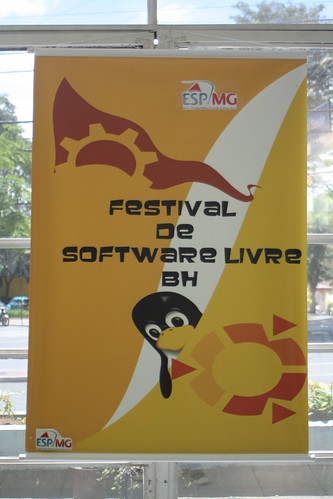
Primeiro Festival de Software Livre de Belo Horizonte

Impressionante, quase mais de uma semana depois e cá estou eu mineirando[1] um tempo livre pra conseguir escrever algumas linhas sobre o assunto.

o primeiro de muitos
(cartaz do evento)

Organização e Infra:
A organização foi bastante competente, não houve nenhum gap - ou pelo menos nenhum que eu tenha percebido. Wifi funcionando em quase 100% do evento e horários de palestras ok - exceto por uns palestrantes furões. Falando em palestrantes...

Palestras:
Ok, confesso que acordei tarde e que cheguei quase na hora do almoço no evento. Ok, *na hora do almoço*. Gastei boa parte da tarde revisando e corrigindo a minha própria palestra.

Mas uma palestra em especial merece algumas linhas a mais: Deixo aqui os parabéns ao Lamarque pela sua palestra-história-de-vida. Passou quase uma hora e meia falando de suas experiências pessoais em escrever driver de kernel, postar na LKML, ser tratorado, resolver bugs postar patches e por ai vai. Gostei disso por dois motivos claros: 1) Isso representa fortemente o espírito de nerd && computeiro - fazer a coisa funcionar por que *pode* e não por que quer provar alguma coisa ou por que alguém mandou. Pelo simples fato de estar interessado e querer resolver. 2) O conteúdo técnico pouco importava, a idéia era que "contribuir com SL não é um bixo de 9 cabeças". Vai lá, leia a documentação, fale com a galera no canal, poste e por ai vai. No fear.

(minha palestra do vimbook - crédito: Djavan)

Falando em palestras, a minha sobre vimbook foi bem divertida. O público era bastante interessado, os exemplos funcionaram na hora e o mais importante: As minhas piadas sem graça mantiveram as pessoas acordadas mesmo depois do devastador almoço de comida mineira. Great! Piadas a parte, o que gostei mesmo foi que as pessoas ficaram interessadas no vimbook, muitos anotaram a URL, perguntaram sobre o projeto e tal. Mission accomplished feelings.


E uma coisa que eu não canso de repetir: Em eventos desse tipo, a coisa que menos importa é ficar na sala prestando atenção na palestra. O networking no boteco pós evento é sempre mais importante. Conhecer pessoas novas, em que trabalham, trocar idéias, links, conexões em redes sociais e por ai vai :-)

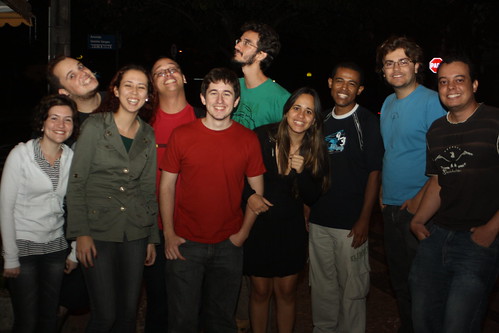
o baile todo
(pessoas de belzônte, porto alegre-tchê e bahia, networking é isso aí ó)

Parabéns a todos da orgzanização, palestrantes e amigos. E que venha o próximo! :-)
Algumas fotos do evento no meu flickr, no flickr do Tuliom e no picasa do Djavan.

[update] os slides da minha palestra estão aqui:


[1] - Ahn?! Ahn?! Entendeu?!

quinta-feira, 16 de julho de 2009

Why do people still download mp3?

This should be a fast-post at anywhere else, but since this is an almost-technical-matter I'll write this post here. I promise it will take more than 140 chars. :)

These days we've been in touch with that p2p crap more than ever. Cybercrimes, PirateBay, Peter Sunde and all that shit surrounding copyrights. I am not discussing this, they're right! We should be able to share midia and content freely at internet... But the point I wanna get is not that.

(picture by: hooverdust)

I was watching MTV Brazil yesterday and I came across an interview where some guy (it doesn't matter the name) points that the trends (oh, the trends) are going to a completely different way: The streaming media. Yes, that's it. Websites like last.fm are overwriting the P2P concept. "Yeah! End of the problem!" you might think - as I thought as well. But two seconds later I realized that this is bullshit. Understand, while our mp3 players and car players doesn't play streaming media, we will still have P2P ruling our connections. Ok, going a little bit deep inside this matter, just think about the infrastructure we would need to have our iPods playing streaming media. This is enough complications for a single post. :)

And just another thought: When I BUY media, I want to do whatever I want with it. Play at my computer (fuck DRM!), play at my cellphone, play in my car driving to work... God, streaming media don't make any sense at all to me.